
Yes, Embroidery Digitizing Services commonly support DST files, and DST is one of the most widely used formats in professional machine embroidery. The format is associated with Tajima embroidery machines and has become a standard way of transferring stitch information from digitizing software to embroidery equipment.
However, simply having a DST file does not always guarantee that an embroidery design will stitch correctly. The file needs to be properly digitized, tested, and prepared for the specific fabric, thread, hoop, and embroidery machine being used.
Understanding how DST files work can help businesses, clothing brands, designers, and individual customers get better results from their embroidery projects. This guide explains what DST files are, why they are important, how Embroidery Digitizing Services use them, and what you should know before ordering a digitized design.
What Is a DST Embroidery File?
DST stands for Data Stitch Tajima. It is a machine embroidery file format originally developed for Tajima embroidery machines.
A DST file mainly contains stitch information. This information tells an embroidery machine where to move its needle and how to create the design.
Unlike a regular image file, a DST file does not simply contain a picture of a logo or artwork. It contains instructions that an embroidery machine can interpret.
For example, a DST file can contain information about stitch placement, movement, and certain machine commands. The embroidery machine follows these instructions to reproduce the design on fabric.
Is DST a Common Embroidery Format?
Yes. DST is widely supported across professional embroidery machines and embroidery software.
Many embroidery shops request DST files because their equipment can read this format directly. It is particularly common in commercial embroidery environments where machines from different manufacturers may be used.
That makes DST a practical format for customers who need their artwork converted into a machine-ready embroidery design.
Why Do Embroidery Digitizing Services Use DST Files?
Professional Embroidery Digitizing Services use DST files because they are compatible with a wide range of commercial embroidery equipment.
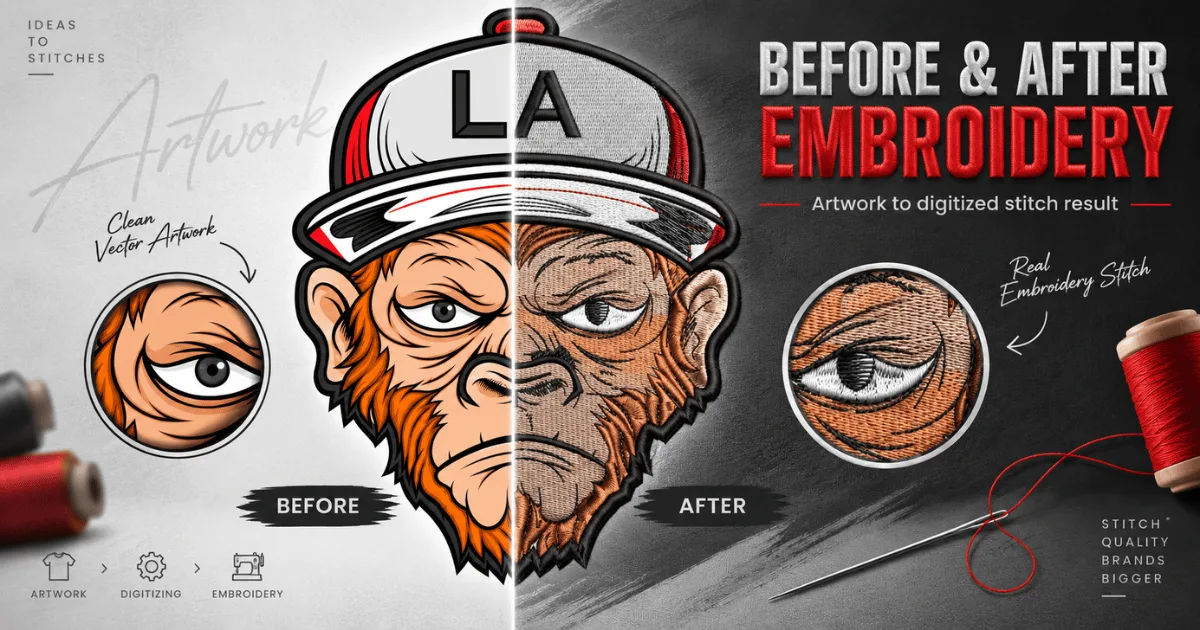
When a customer provides a logo in JPG, PNG, PDF, AI, or another artwork format, the image cannot normally be sent directly to an embroidery machine. It first needs to be converted into stitches.
This process is called embroidery digitizing.
A digitizer studies the artwork and determines how different areas should be stitched. They select stitch types, densities, directions, underlay settings, and other technical details.
After the design has been digitized, it can be exported into a machine embroidery format such as DST.
DST Converts Artwork Into Stitch Instructions
An important difference between artwork and a DST file is that artwork describes appearance, while a DST file describes embroidery movements.
A logo might contain smooth curves, small text, gradients, or detailed shapes. The embroidery machine cannot reproduce these elements in exactly the same way as a printer.
The digitizer therefore has to translate visual elements into practical stitch structures.
This is where experienced Embroidery Digitizing Services provide value. They do more than convert a picture into another file extension. They prepare the artwork specifically for embroidery production.
How Is a DST File Created?
Creating a DST file usually begins with the customer's original artwork.
The digitizer imports the artwork into professional embroidery software. They then analyze the design and decide how each section should be embroidered.
Step 1: Artwork Preparation
The artwork is reviewed before digitizing begins.
The digitizer may need to clean up unwanted elements, simplify complicated shapes, improve outlines, or adjust small details.
High-quality artwork can make the digitizing process easier, but even simple artwork requires technical decisions.
Step 2: Stitch Type Selection
Different sections of a design require different stitch types.
A digitizer may use satin stitches for borders and narrow lettering. Fill stitches can cover larger areas, while running stitches may be suitable for outlines or fine details.
Choosing the correct stitch type helps create a clean and durable embroidered result.
Step 3: Stitch Density and Direction
Stitch density determines how closely stitches are placed together.
If the density is too low, fabric may show through the design. If it is too high, the embroidery can become stiff, bulky, or cause thread and needle problems.
Stitch direction also matters because it affects the appearance and structure of the finished embroidery.
Experienced Embroidery Digitizing Services adjust these settings according to the design and fabric rather than relying on one setting for every project.
Step 4: Underlay and Stabilization
Underlay stitches are placed beneath the main embroidery in many designs.
They can help stabilize the fabric and create a foundation for the visible stitches.
The appropriate underlay depends on factors such as fabric type, design size, stitch structure, and embroidery technique.
Step 5: Exporting the Design
Once the digitizing work is complete, the design can be exported as a DST file if the customer's machine requires it.
The resulting file contains the stitch instructions needed by compatible embroidery equipment.
Does Every Embroidery Machine Read DST Files?
Not necessarily.
DST is extremely common, but embroidery machines can use different proprietary or machine-specific formats.
Some machines may require formats such as PES, JEF, EXP, VP3, XXX, or another file type.
For this reason, customers should provide their machine brand and model to the digitizer whenever possible.
A professional Embroidery Digitizing Services provider can then recommend the appropriate output format.
Why Machine Information Matters
The machine model can affect how a design should be prepared.
Different machines can have different requirements for hoop sizes, thread changes, machine commands, and other production details.
Providing the machine information reduces the risk of receiving a file that cannot be used properly.
If DST is required, the digitizer can export the final design in that format. If another format is needed, the design can often be exported accordingly from the digitizing software.
Is a DST File the Same as a JPG or PNG?
No. These file types serve completely different purposes.
JPG and PNG are image formats designed for displaying graphics. They contain pixels and are commonly used for websites, social media, printing, and digital artwork.
A DST file is a machine embroidery format containing stitch information.
For example, you may have a PNG version of a company logo, but an embroidery machine cannot normally use that PNG directly. The logo must first be digitized.
This is why customers often work with Embroidery Digitizing Services when they want to turn existing artwork into an embroidered logo.
What Information Does a DST File Contain?
A DST file primarily contains machine-readable stitch and movement information.
It can tell the machine where to stitch and when to move between different areas of a design.
However, DST has limitations compared with some newer or more feature-rich embroidery formats.
For example, color information may not be stored in the same comprehensive way as it is in some other embroidery formats. The thread colors displayed by embroidery software may therefore depend partly on the software being used.
The actual stitch sequence remains the critical part of the file.
Does DST Store the Original Artwork?
No.
Once artwork has been digitized and exported to DST, the DST file should not be treated as an editable copy of the original logo.
It is better to keep the original artwork and the editable digitizing file separately.
If major changes are needed later, the digitizer may need to modify the embroidery design using the original artwork or the native embroidery project file.
What Makes a Good DST File?
A good DST file is not simply one that opens successfully on an embroidery machine.
It should also produce clean, consistent, and practical embroidery.
Important factors include appropriate stitch density, logical stitch sequencing, suitable underlay, proper pull compensation, clean transitions, and reasonable thread changes.
The design should also be suitable for the intended fabric and finished size.
This is one reason professional Embroidery Digitizing Services are valuable for commercial embroidery. Proper digitizing can reduce production problems and improve the appearance of the final product.
Why Test Stitching Is Important
A design may look excellent on a computer screen but produce unexpected results when stitched.
Fabric behaves differently from digital artwork. It can stretch, compress, shift, or react to dense stitching.
Testing allows the digitizer or embroiderer to identify problems before the design is used for a large production order.
Problems a Test Stitch Can Reveal
A test run may reveal excessive density, gaps, poor registration, thread breaks, puckering, uneven lettering, or incorrect stitch direction.
Small text can also become difficult to read when embroidered, especially if the design is reduced too much.
Professional Embroidery Digitizing Services can make adjustments after testing to improve the production result.
Can DST Files Be Edited?
DST files can sometimes be opened and modified using embroidery software, but editing them is not always as straightforward as editing the original digitizing project.
The file contains stitch information rather than the complete design structure used during the original digitizing process.
Changing individual stitches manually can be possible, but significant modifications may require more extensive editing or even partial redigitizing.
For this reason, it is useful to keep the original embroidery project file whenever possible.
What Should You Send to a Digitizer?
The best starting point is usually high-quality artwork.
Vector files such as AI, EPS, or SVG can be particularly useful because they can preserve clean shapes and curves. High-resolution PNG or other clear artwork can also work well.
You should also provide important production information.
Tell the digitizer the desired embroidery size, garment or fabric type, preferred thread colors, and machine format.
If your machine requires DST, mention it before the project begins.
Information Worth Providing
A useful project brief can include:
-
Original logo or artwork
-
Desired finished dimensions
-
Garment or material type
-
Preferred thread colors
-
Placement of the design
-
Required embroidery machine format
-
Machine brand and model
-
Expected production quantity
Giving complete information allows Embroidery Digitizing Services to make better technical decisions.
Can DST Files Be Used for Caps and Jackets?
Yes. DST files can be used for many different embroidery applications, including caps, jackets, shirts, uniforms, bags, patches, and other embroidered products.
The important issue is not simply the file format. The design must be digitized appropriately for the item.
Caps, for example, have curved surfaces and can require specialized digitizing techniques.
Heavy jackets may require different settings from lightweight shirts.
A design that works perfectly on a flat cotton shirt may need adjustments before it is embroidered on a structured cap.
How Do You Choose a Reliable Digitizing Service?
When selecting Embroidery Digitizing Services, do not judge a provider only by price.
Look at their portfolio and examine whether their previous work has clean edges, readable lettering, smooth curves, and consistent stitching.
Ask whether they provide the required machine format and whether revisions are included.
It is also useful to ask about turnaround time, test stitching, and the availability of different file formats.
A reliable provider should understand the difference between simply converting artwork and actually preparing a design for embroidery production.
Common Mistakes With DST Files
One common mistake is assuming that changing a file extension will convert artwork into embroidery.
For example, renaming a PNG file as a DST file does not create a genuine embroidery design.
Another mistake is using the same digitized file at dramatically different sizes without checking its stitch structure.
A design digitized for a large jacket back may not produce good results when reduced to a small chest logo.
Ignoring the fabric is another frequent problem. Different materials require different approaches to density, underlay, and stitch direction.
Professional Embroidery Digitizing Services consider these factors during the digitizing process.
Frequently Asked Questions
Are DST files suitable for commercial embroidery?
Yes. DST files are widely used in commercial embroidery and are supported by many professional embroidery machines. However, compatibility should always be confirmed with the specific machine being used.
Can I convert a JPG directly into a DST file?
A JPG needs to be digitized before it becomes a usable embroidery file. Simple file conversion does not create the stitch instructions required by an embroidery machine.
Do all digitizers provide DST files?
Many professional digitizers provide DST because it is a widely requested format. Still, customers should confirm the required format before ordering.
Is DST better than other embroidery formats?
DST is not necessarily better for every machine. It is simply a widely supported format. The best format depends on the embroidery machine and the production requirements.
Can a DST file be used on a home embroidery machine?
It depends on the machine. Some home machines support DST, while others require a different format. Always check the machine's documentation before ordering or transferring a design.
Conclusion
DST remains one of the most important file formats in machine embroidery, particularly in professional and commercial production. It provides embroidery machines with the stitch and movement information needed to reproduce a digitized design.
However, the quality of a DST file depends heavily on the digitizing behind it. A poorly prepared design can result in thread breaks, puckering, excessive density, unreadable lettering, and other production problems even if the machine accepts the file.
This is why choosing experienced Embroidery Digitizing Services can make a significant difference. A skilled digitizer considers the artwork, embroidery size, fabric, stitch types, density, underlay, sequencing, and machine requirements before exporting the final file.
Customers should also remember that DST is not an image format. It is a machine embroidery format. A JPG, PNG, or similar image must first be converted into appropriate stitch instructions through a proper digitizing process.
Before placing an order, provide the original artwork, desired size, fabric information, thread requirements, and embroidery machine details. If your machine requires DST, clearly communicate that requirement to the service provider.
Ultimately, the question is not only whether Embroidery Digitizing Services support DST files. The more important question is whether the provider can create a properly digitized DST file that performs well on your specific machine and material. When the digitizing is carefully prepared and properly tested, DST can be a reliable and practical format for producing professional-quality embroidery.
